
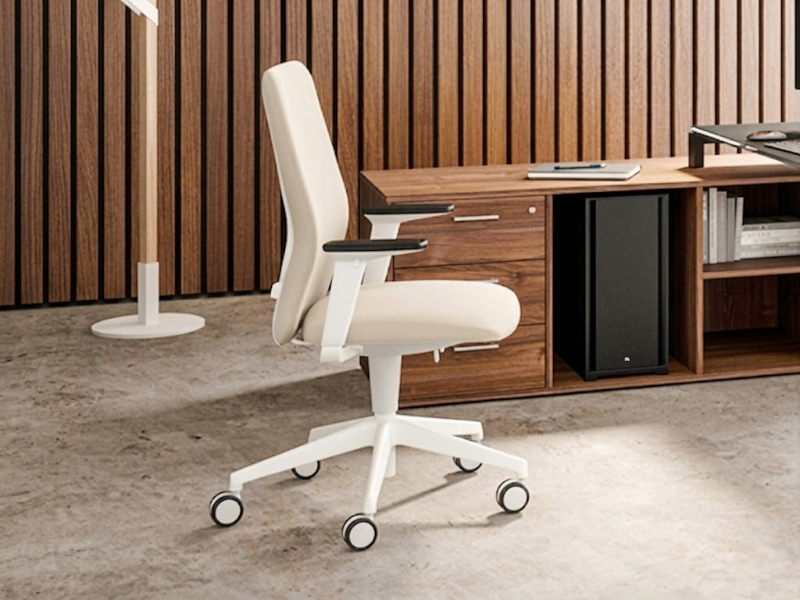
EN 1335 office chairs and ergonomics: a simple guide to choosing the right office chair
The office chair is one of the most underestimated elements when designing operational workstations. Desks, monitors, lighting and layout are important, but it is the chair that supports the body for many hours a day, influencing posture, comfort, concentration and the quality of work.
When we talk about EN 1335 office chairs, the issue is not simply “choosing a comfortable chair”. It means understanding dimensional requirements, safety, stability, adjustments, ergonomic mechanisms and the correct combination with the workstation.
The UNI EN 1335-1 standard concerns the dimensions of office work chairs and the methods used to determine them; according to UNI, the version adopted with Amendment 2022 specifies four types of office work chairs and does not apply to children’s seating.
What EN 1335 means for an office chair
EN 1335 is the European technical reference for office work chairs. It does not simply define a chair as “beautiful” or “comfortable”, but introduces measurable criteria related to dimensions, safety, strength and durability.
Part 1, in particular, concerns dimensions and classifies chairs into dimensional types; chairs of type Ax and A offer greater adjustability and a wider adaptation range than types B and C.
EN 1335-2:2018, on the other hand, specifies safety, strength and durability requirements for office work chairs, with reference to use of up to 8 hours per day by people weighing up to 110 kg.
During the purchasing phase, it is therefore important to check not only the commercial term “ergonomic”, but also the presence of technical sheets, test reports or declarations of conformity referring to the correct standard.
Ergonomics: a padded chair is not enough
An ergonomic chair is not simply a soft seat. It is a chair that allows the body to assume and vary several postures throughout the day, supporting the back, pelvis, legs and forearms without restricting movement.
EN 1335-1 itself refers to the importance of postural variation: the design of the chair should encourage frequent user movement in order to reduce muscular stress and circulatory problems.
A correct chair should therefore allow:
- height adjustment;
- effective lumbar support;
- adjustable backrest;
- stable and proportionate seat;
- smooth rotation;
- controlled movement;
- correct support for the forearms, where armrests are present.
Real comfort comes from the possibility of adapting the chair to the person, not from forcing the person to adapt to the chair.
The key adjustments to evaluate
Seat height
Height adjustment is the first ergonomic requirement. It allows the feet to rest on the floor, the knees to remain in a natural position and the body to be aligned with the work surface.
Italian Legislative Decree 81/2008, in Annex XXXIV relating to equipment fitted with visual display units, requires the work chair to be stable, allow freedom of movement and have height adjustment independent from the backrest.
Backrest and lumbar support
The backrest must support the dorso-lumbar area, meaning the lower and central part of the back. Correct lumbar support helps maintain the natural curve of the spine, reducing the tendency to slide forward or collapse the shoulders.
Annex XXXIV also requires the backrest to provide adequate dorso-lumbar support, be suited to the anthropometric characteristics of the user and have adjustable height and inclination.
Seat depth
Seat depth has a significant impact on comfort. A seat that is too deep can compress the back of the knees; one that is too short does not correctly support the thighs.
In advanced operational chairs, seat slide adjustment is useful, meaning the possibility of moving the seat pan forwards or backwards. This adjustment is particularly important in offices with users of different body types or in shared workstations.
Armrests
Armrests are not an aesthetic accessory. They help relieve part of the load on the shoulders, neck and forearms. In operational contexts, armrests adjustable at least in height are preferable; in more advanced models they may also be adjustable in depth, width and orientation.
The choice depends on the type of activity: for intensive work at a visual display terminal, adjustable armrests help maintain a more stable posture; for very compact workstations, dimensions and compatibility with the desk top should be checked.
Synchronised mechanism
The synchronised mechanism allows the seat and backrest to move in a coordinated way, following the inclination of the body. It is one of the most effective solutions for encouraging dynamic posture and micro-movements throughout the day.
Compared with a static chair, a good synchronised chair allows the user to alternate between working position, reclined support and reading posture without losing support.
Types of office chairs
Operational chairs
These are the most widely used chairs for individual workstations, bench workstations and open spaces. They must be adjustable, robust, easy to adapt and suitable for prolonged use.
They are suitable for administration, back office, design work, customer care, technical roles and everyday activities at a visual display terminal.
Advanced task chairs
Higher-end task chairs integrate more precise mechanisms, dynamic lumbar supports, sliding seats, multidirectional armrests and technical mesh or upholstered backrests.
They are ideal when the workstation is used for many hours a day or when the company wants to standardise high-performance ergonomic seating.
Executive chairs
Executive chairs prioritise comfort, representation and the quality of finishes. Leather, premium faux leather, technical fabrics, aluminium bases and high backrests are common, but the aesthetic component should not replace ergonomic adjustments.
A good executive chair must maintain support, stability and movement criteria consistent with work use.
Meeting and visitor chairs
Not all office chairs need to have the same characteristics. A meeting chair may be less adjustable than an operational chair, because its use is shorter and more discontinuous. However, it must guarantee stability, comfort, ease of movement and consistency with the environment.
How to choose the right office chair
The choice should not start from price, but from the usage profile.
For a workstation used all day, operational chairs with a synchronised mechanism, height adjustment, ergonomic backrest, lumbar support and adjustable armrests are required. For meeting rooms and touch-down areas, simpler chairs may be sufficient, provided they are proportionate and stable.
The main criteria are:
- Daily duration of use
More hours of use require more adjustments and higher mechanical quality. - Type of activity
Focused work, frequent calls, design work, front office and executive roles have different needs. - Single or shared users
Shared workstations require chairs that can be easily adjusted by people with different body types. - Compatibility with desk and monitor
The chair should be chosen together with the workstation, not as an isolated element. - Technical documentation
Declared conformity must be supported by a product sheet, certifications or relevant test reports.
Common mistakes when choosing office chairs
One of the most frequent mistakes is choosing the same chair for the whole office without distinguishing between operational workstations, meeting rooms, waiting areas and executive spaces.
Another mistake is prioritising only padding and design. A very soft chair may seem comfortable in the first few minutes, but may provide insufficient support after a few hours.
Finally, the “minimum requirement” approach should be avoided: a chair without adequate adjustments can generate discomfort, incorrect postures and continuous micro-interruptions. In a working environment, the chair is an ergonomic device, not a simple furnishing accessory.
Quick purchasing checklist
Before choosing an office chair, it is useful to check:
- presence of an EN 1335 reference in the documentation;
- height adjustment;
- adjustable backrest;
- adequate lumbar support;
- proportionate seat and, where necessary, seat slide adjustment;
- quality synchronised or tilt mechanism;
- adjustable armrests;
- stable base with castors suited to the floor surface;
- breathable and cleanable materials;
- warranty, spare parts and after-sales assistance.
FAQ
What does EN 1335 chair mean?
It means that the chair is designed or tested according to the requirements of the European EN 1335 standard for office work chairs, with reference to dimensions, safety, stability, strength and durability.
Is an EN 1335 chair always ergonomic?
EN 1335 conformity is an important technical reference, but real ergonomics also depends on adjustments, the user’s body type, the work surface, monitor, daily use and correct workstation setup.
What adjustments should a good office chair have?
The most important adjustments are seat height, backrest inclination, lumbar support, possible seat slide adjustment and adjustable armrests. For prolonged use, a synchronised mechanism is recommended.
Is a mesh or upholstered backrest better?
It depends on the environment and the type of comfort desired. Mesh offers breathability and visual lightness; upholstery offers a more enveloping and material feel. In both cases, lumbar support and mechanism quality are what matter.
When is a footrest needed?
A footrest is useful when the user cannot correctly place their feet on the floor after adjusting the chair according to the height of the work surface.
Choosing an office chair means designing comfort, posture and daily productivity. Ufficiostile supports companies, professional studios and organisations in selecting operational, executive and meeting chairs that meet the ergonomic, functional and aesthetic needs of every work environment.